


If you have tried to update Electrum wallet on your Ubuntu 20.04 machine, most likely you ran into an error.
E: Unable to locate package python3-pyqt6
The reason is that there is only PyQt5 (PythonQt) in the repository of Ubuntu 20.04 but new versions of Electrum like 4.7.2 require PyQt6. And at this point you should not try to update Electrum via apt and instead use the official Electrum AppImage. Here I explain how to do it.
Backup
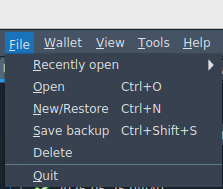
First things first. Download your wallet backup. It only takes a couple of seconds but can save you a lot of trouble. Also make sure you have your seed phrase.
Updating
Download AppImage from electrum official website [4.7.2]
Make sure you downloaded the image from official website and not some third-party website.
cd ~/Downloads
wget https://download.electrum.org/4.7.2/electrum-4.7.2-x86_64.AppImage
chmod +x electrum-4.7.2-x86_64.AppImage
./electrum-4.7.2-x86_64.AppImage
Since AppImage is a portable executable file, we can create a launcher, so that it opens as normal application.
- Create folder for the AppImage:
mkdir -p ~/Applications - Move Electrum file over there:
mv ~/electrum-4.7.2-x86_64.AppImage ~/Applications/Electrum.AppImage - Edit desktop launcher:
nano ~/.local/share/applications/electrum.desktop - You will see the contents like below
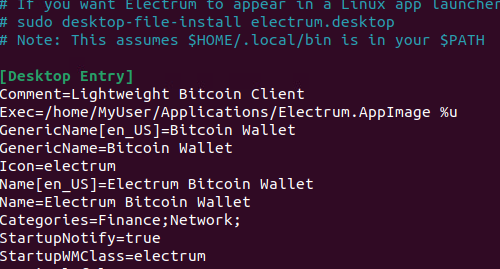
- In the Exec you will see something like:
Exec=electrum %uYou need to change it to the path of your AppImage, like:Exec=/home/YourUser/Applications/Electrum.AppImage chmod +x ~/.local/share/applications/electrum.desktop
That’s it. After this, the new Electrum version will launch when you click on your desktop icon.













No Comments
Leave a comment Cancel